That doesn’t appear to be what’s happening here. Let me show you an example email. It’s heavilty redacted, but I think I can still get the idea across.
Look at this image:
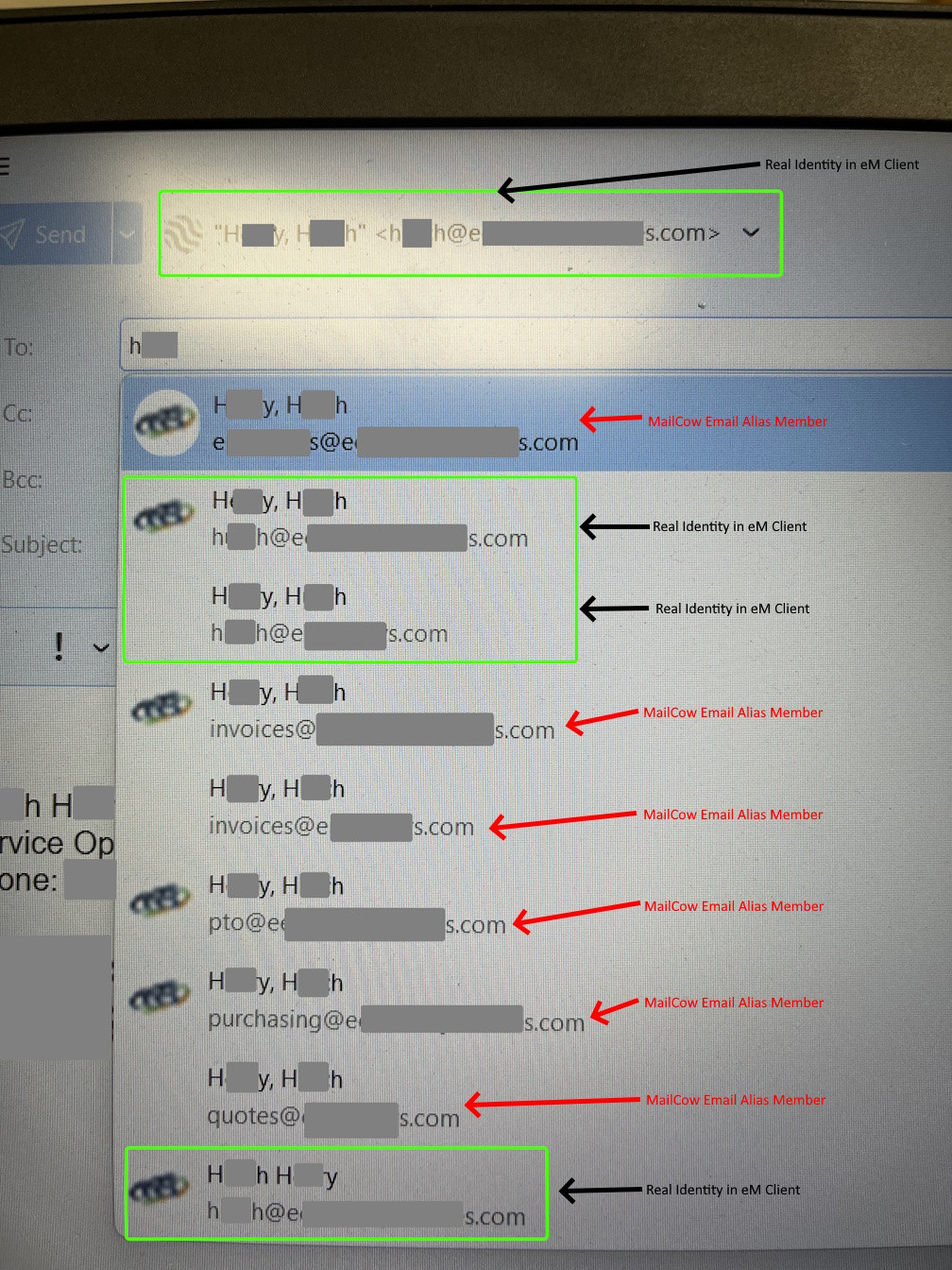
At the top, you can see this person’s real identity as it is defined in the account settings of eM Client. He will never email out as anything except this one identity.
Below that, you can see three entries (with black arrows) where his valid email addresses appear. These are email addresses that only belong to him, and no one else. If you email one of the three email addresses with the black arrow, they will only go to him.
But searching on any fragment of his real name, I get 9 results. That’s because the other 6 results are from email aliases that he is a member of.
Because he’s one of the management staff, he is in a number of those email aliases. Prior to this, in M$ Exchange, we called these Distribution Groups.
Again, he will never email OUT as one of these 6 addresses, and they are not set up as seperate identities in eM Client, and we don’t want them to be. But, when someone emails one of those 6 addresses, he will get a copy of the email, as will every other member of that email alias.
The problem is people. People are terrible about paying attention, and not every person is computer savvy. So in this case the email author’s intent was to email this guy directly with a concern. But the result was they emailed the entire company, because that top address with the Red arrow? That’s basically “Everybody AT company.com”
So, why and how did this happen?
Well, it turns out that if you search on the name of any person in the global address list, you will get entries for not just their email address, but also entries for every email alias they are a member of. And if the top result happens to be a distribution group email alias in between the brackets, well…. you just emailed the group, not just the person.
So, for good reason, the manager whose name I have heavily redacted out of this image is upset. Because what should have been a relatively private email between a staff member and his manager turned into an email between a staff member and all of his co-workers… and not just that, but also the owners, and the interns. Everyone got this email, because unfortunately, the top entry is basically an email alias that goes to the whole company. And it also is easy to mistake it for his manager.
So, my job is to figure out how to keep this from happening again.
Similarly, here’s another image:
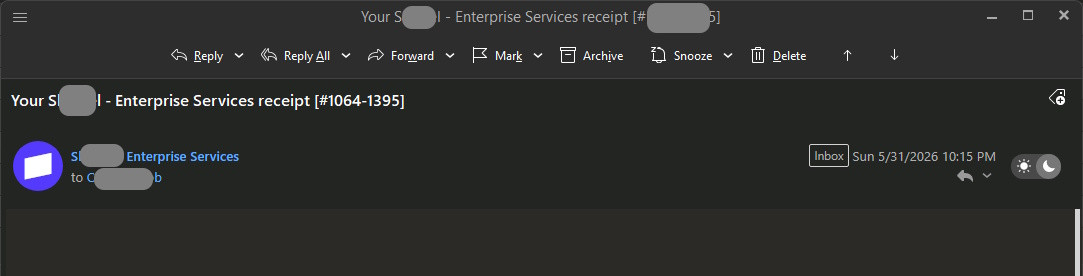
This one is from my mailcow server. It was sent to purchasing@[mycompany].com.
Take a look at the “to” field. Do you see how it appears to have been sent to C…b?
Ask yourself: does purchasing@mycompany.com have any string of letters that would seem to match up with, or be confused with C…b?
Nope. It doesn’t. So why did it appear this way in eM Client? Is it an eM Client problem? It turns out, no, it appears this exact same way in SOGo, so it’s not an eM Client problem but rather a problem on the server side of the house.
So how did this appear to be sent to C…b? Because that person is a member of the purchasing@[mycompany].com email alias. And the more purchasing@ emails I get, the more I see not just that person’s name, but also other members of the purchasing@ email alias’s names.
It’s not random - things rarely are - but it does appear to be random.
And again, put yourself in the shoes of someone who is not tech savvy… would they assume this came to a distribution group email alias, or would they assume this came to “C. ..b”? And since the answer is most definitely the latter. If/when they hit reply, they assume that their reply is going to “C. ..b” as well.
Watch what happens when I click on the person’s name:
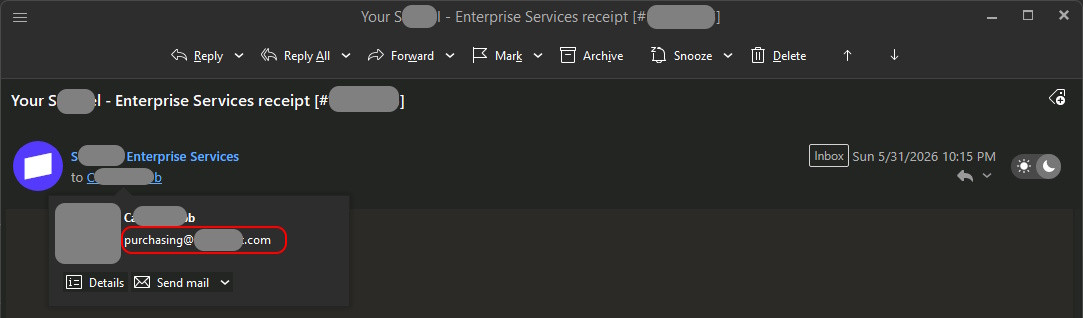
Here we can clearly see that the email went to purchasing@[mycompany].com, and not specifically to “C. ..b”
This sows confusion. If you’re that guy that meant to send an email to “C. ..b” and it accidentally went to everyone in the purchasing@[mycompany].com group, you’re not going to trust the email system. You’ll start using phone texting instead, which is it’s own nightmare of problems.
So… what I’m asking for is:
if this is not a misconfiguration on my part - we treat this as a bug and look for a way to resolve it.
My fear is that if it does not get resolved, we’re going to have a lot of angry end users, and then angry management., If that happens, I don’t see this project going further. Not if company ownership/management cannot trust the email product.
So, I’m just looking for a solution that can be implemented on the server side. A great “middle ground” fix would be if we could give the email aliases a proper name, and then make that the “To” label instead of a random person’s name who belongs to that group.
Also, just as a side thought: if I can type in a person’s name and see every email alias they are a member of, I can see where that might be a security problem. Imagine if you have an under-performing employee and they ask you to forward a copy of that person’s email to a group of managers…. would it be a good idea of I typed in “Ron Sw” and found out that “Ron Swanson” is a member of an email alias called “leslie_email_cc@pawnee.org”? Would I then go looking to see who else was a member of “leslie_email_cc@pawnee.org”? Possibly.
Thanks for reading and listening!
Update: I just went to my “Personal Address Book” on SOGo and searched on purchasing@[mycompany].com, and a list of 7 matching contacts came up. Of those, 2 are duplicates of each other, so there are two “M. ..r” entries. One is the actual email alias itself.
Clicking on any one of the individuals that appeared, one of their “work” email addresses is “purchasing@[mycompany.com]”. There are also other email aliases in there too. For just one person, I have 5 work email addresses, 4 of which are email aliases.
Since I’m one of the principles in my company, mine has 15 email addresses. 14 are email aliases, and only 1 of them is actually mine.
I thought this was a Global Address Book problem; it’s not. It’s an personal address book / individual contacts problem.
Update 2: Actually, it is a Global Address Book problem. If I click on the Global Address Book on the left, and then select my name, that’s where all the email addresses are. My guess is that a device (like my phone) is doing something like “add all the contacts and then deduplicate”.
